Deep Think - AI Seek Chatbot
- 4.8
- Rating
- 5.00M
- Installs
- Free
- Price

 Analysis by App-foxy
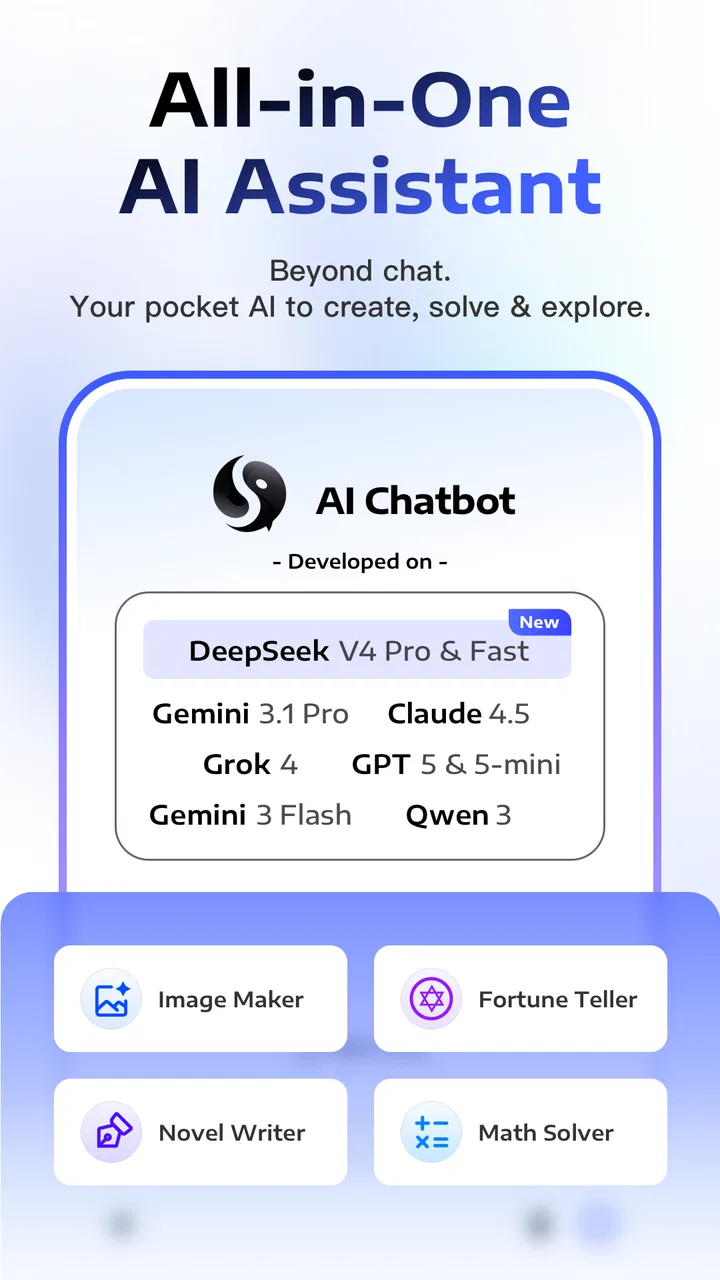
Deep Think - AI Seek Chatbot is the kind of productivity app I would try when I want one place for questions, drafting, brainstorming, and image-related work instead of jumping between several AI tools. Its appeal comes from bringing access to GPT Image 2, Gemini 3 Pro, Grok, Claude, and DeepSeek V4 into one chat-focused experience. In my view, that makes it more interesting than a simple chatbot, but it also means the quality of the experience depends heavily on choosing the right model and knowing how to recover when a conversation does not go as planned.
Developed by Guru AI Lab, the app is free to install and is rated for Everyone. It belongs to the productivity category, so I see it less as a toy and more as a flexible assistant for everyday work. The current Android release is version 2.9.5-26081987, and it requires Android 7.0 or later. It has already passed five million installs and holds a 4.8 average from around sixty-nine thousand ratings, which suggests that the basic idea is connecting with a broad audience.
What Deep Think feels like in everyday use
The first thing I noticed is that the app is easiest to understand if I treat it as a workspace rather than as a single-answer search box. I can ask for a quick explanation, continue with follow-up questions, change the tone of a draft, or move from text work toward image creation. That continuity is useful when I am working on something that develops over several steps.
You May Also Like

 Blood Strike: 2.5 Anniversary
Blood Strike’s Loadouts Turn Every Drop Into a Tactical Gamble
A close look at Blood Strike’s custom loadouts: how fast access to signature weapons reshapes its battle royale rhythm, rewards preparation, and narrows the gap between fights.

 Pandora - Music & Podcasts
Pandora’s Music Is Easy to Start, but Harder to Recover
Pandora’s strength is its low-effort path from a seed to a station. Its weak spot is how much confidence it asks you to place in connection, setup, and quiet recovery.

 8 Ball Pool
 Is Built on Rivalries, Rematches, and Routine
A close look at the rivalries, rematches, shared routines, and unanswered safety questions that turn a quick pool match into a persistent mobile community.

 Samsung Music
’s Quiet Strength Is Playing What You Already Own
Its reach comes less from spectacle than from dependable access to a personal library. That simplicity is both the app’s strongest retention engine and its ceiling.

 AccuWeather: Weather Radar
AccuWeather Review: A Quick, Clear Forecast for Everyday Decisions
For everyday plans, the best forecast is the one you can understand quickly. AccuWeather makes rain timing, radar, and local conditions easy to act on, with a few trade-offs.

 Hill Climb Racing
Why Hill Climb Racing Still Turns Crashes Into One More Run
A tiny car, a bumpy hill and one more upgrade: Hill Climb Racing keeps resurfacing because its simple chaos makes every near-miss feel personal.
More From Our News Desk



A realistic example would be planning a small event. I might ask for a simple schedule, request a shorter version for a message, then ask for a visual concept for an invitation. With separate apps, I would copy information from one service to another. Here, the attraction is keeping those stages close together. I still need to check the result myself, but the workflow feels more natural than treating every task as an isolated prompt.
The presence of several named AI systems is also more meaningful than a long feature list might suggest. Different models can be better suited to different kinds of requests, even when the app presents them within one product. I would use a conversational model for exploring an idea, a more careful model for refining wording, and an image-focused option when the task becomes visual. The important habit is not assuming that the first response is automatically the best one.
That flexibility can also create friction. A newcomer may wonder which model to select, whether a request should stay in the same chat, or why two answers to similar prompts feel different. Deep Think is most rewarding when I am willing to guide the process. If I only want a very predictable assistant with one familiar style, a single-model app may feel calmer.
Where people commonly get stuck
The first obstacle is usually not the conversation itself but the transition between tasks. A user may begin with a writing request, then expect the same context to carry perfectly into image creation or into a new model. I would avoid making that assumption. Before switching direction, I would restate the essential details: the audience, the format, the tone, and any limits that matter. This small step reduces confusion when the next response does not seem to remember the whole purpose.
Another common sticking point is vague prompting. “Make this better” can mean shorter, clearer, friendlier, more persuasive, or more formal. I get better results from naming the exact change I want and including the original text directly. For example, asking for a polite message in three sentences is more useful than asking the app to improve a message without explaining the goal.
Image requests deserve the same care. I would describe the subject, setting, mood, composition, and anything that must not appear. If the first result is close but not right, I would adjust one or two elements at a time rather than replacing the entire prompt. That makes it easier to understand which instruction changed the outcome.
There is also a practical distinction between a bad answer and a failed request. A weak answer usually benefits from a clearer instruction or a different model. A failed request may be related to the connection, temporary service availability, or the app state. Treating both problems as if they were the same leads to unnecessary frustration.
Setup checks that save time
Because Deep Think is available at no upfront cost, I would begin with a small, low-stakes test instead of immediately building an important project around it. Ask for a short summary, a simple rewrite, or a basic idea. This confirms that the app opens correctly, accepts messages, and behaves normally on the device before I depend on it for something urgent.
I would also check the Android requirement before installing. Android 7.0 or newer is supported, but an older device can still feel slow if several demanding tasks are running at once. Closing unused apps, keeping enough free storage, and using a stable connection are sensible preparation for any AI tool, especially one that may handle both conversation and image creation.
The free entry point is helpful for exploring the service, but I would pay attention before starting any purchase. In-app items range from $6.99 to $99.99 each, so I would review the purchase screen carefully and decide whether the available free use already covers my needs. I would not subscribe or buy anything simply because a response took longer than expected or because one prompt failed.
For a first session, I recommend creating a small personal test plan. Try one factual question, one rewriting task, one multi-step request, and one image-oriented prompt. Compare how much direction each task needs. This gives a more honest sense of whether the app fits your habits than relying on a single impressive answer.
It is also worth deciding what information not to paste into a chat. I would remove private identifiers, confidential business material, passwords, and sensitive documents before asking for help. Even when an app is convenient, convenience should not replace ordinary care with personal or professional information.
How I recover when a workflow breaks
My first recovery step is to separate the task into smaller parts. If a long request produces an incomplete or confusing result, I would ask the app to handle only the first stage. For example, instead of requesting research, a polished article, a social caption, and an image concept in one message, I would begin with an outline, review it, and then continue. This makes mistakes easier to spot and correct.
If the answer is off-topic, I would not keep adding random instructions to the same conversation. I would write a short reset message that states the goal again, identifies the unwanted direction, and specifies the desired format. When that still does not help, starting a fresh chat can be cleaner than carrying a growing trail of conflicting instructions.
Model switching should be deliberate. If a response is imaginative but lacks structure, I would try a more reasoning-oriented option and provide the same prompt with clearer constraints. If the result is technically organized but sounds unnatural, I would ask for a warmer rewrite or choose a conversational approach. The useful insight is that model choice is part of the workflow, not merely a setting to ignore.
When an image request does not match the description, I would revise the prompt in layers. First clarify the main subject, then the layout, then the style. I would avoid changing every detail at once because that makes it difficult to learn from the result. Keeping a successful phrase and modifying only the weak part is often more efficient than starting from nothing.
A stalled response deserves a different approach. I would check whether other apps can connect normally, retry once, and then return later rather than repeatedly sending the same request. If only one conversation behaves badly, a new chat may help. If the entire device is having connection trouble, changing prompts will not solve the underlying problem.
When the app is not the cause
AI output can be disappointing even when Deep Think is working correctly. The model may misunderstand an ambiguous request, lack the context needed for a specialized question, or produce a confident statement that needs checking. I would verify important facts through reliable sources instead of treating fluent wording as proof.
This matters especially for school, work, health, legal, and financial subjects. The app can help me organize questions, compare explanations, or turn notes into a clearer draft, but I would not make a serious decision from an unverified response. Its productivity value is strongest when I remain the editor and decision-maker.
Sometimes the real limitation is the task itself. A request that depends on a private database, an unavailable document, or exact information that was never included cannot be repaired by adding more adjectives. I would provide the missing context, attach or paste the relevant material when appropriate, or use a specialist tool that is designed for that source.
There is a similar issue with writing style. If I ask for a “professional” text without explaining the audience, the result may sound stiff or generic. I get more useful work by describing who will read it, what action I want them to take, and what tone would feel natural. Deep Think can revise language well, but it cannot guess every personal preference.
Compared with a traditional notes app, this service is better for transforming rough thoughts into outlines, drafts, explanations, and alternative versions. Compared with a conventional search engine, it is more comfortable for back-and-forth exploration, but I would still use direct sources when accuracy and traceability matter. Compared with a single-model chatbot, its broader selection is the main advantage, while the added choice may require more experimentation.
Who will get the most from it
I think Deep Think suits students who want help turning scattered notes into study questions, summaries, or revision plans, provided they check the content. It also fits freelancers and small teams that need quick drafts, meeting preparation, content variations, or early visual ideas without opening several separate tools.
It can be useful for everyday personal tasks too. I might use it to rewrite a difficult email in a friendlier tone, plan a weekend activity, generate a checklist, or explain an unfamiliar concept in simpler language. The benefit is not that every answer is perfect; it is that the app gives me a workable starting point quickly.
Creative users may appreciate the move between conversation and image creation. A writer can explore a setting, refine a description, and request a visual direction. A small business owner can brainstorm a product message and then develop an initial image concept. I would treat those images as exploratory material unless they meet the exact standard required for publication.
On the other hand, I would skip it if I want a narrow, highly controlled tool with no need to compare models. I would also hesitate to make it the only system for sensitive professional work, strict source-based research, or workflows that require guaranteed consistency. Users who dislike experimenting with prompts may find the flexibility more tiring than helpful.
My practical verdict
After using Deep Think as a general productivity companion, I see its strongest quality in the way it gathers several kinds of AI work into one place. The combination of chat and image creation, along with access to GPT Image 2, Gemini 3 Pro, Grok, Claude, and DeepSeek V4, gives me more room to adapt a task instead of accepting the first available style.
The trade-off is that good results require participation. I need to choose a suitable model, give enough context, split complicated jobs into stages, and review important answers. The app does not remove those responsibilities; it makes them easier to manage when I use a disciplined workflow.
At no cost to install and with an Everyone rating, it is easy to test without committing immediately. I would explore the free experience first, keep purchase decisions separate from troubleshooting, and remember that individual in-app items can cost from $6.99 to $99.99. That pricing range makes it especially important to understand my actual usage before spending money.
My recommendation is straightforward: try it if you want a versatile AI workspace for drafting, learning, brainstorming, and visual experimentation on Android. Start with modest tasks, compare the available approaches, and save the workflows that consistently help. If you need a single predictable assistant or a specialist system with stronger source control, another option may suit you better. For everyone else, Deep Think - AI Seek Chatbot is a capable and flexible starting point, as long as I treat its answers as assistance rather than automatic truth.
FAQs for Deep Think - AI Seek Chatbot
01What is Deep Think - AI Seek Chatbot and what can it do?
Deep Think - AI Seek Chatbot is an artificial intelligence assistant designed to answer questions, explain topics, generate written content, summarize information, and help with everyday tasks. During testing, it was most useful for brainstorming, rewriting text, preparing messages, and getting quick explanations. Its responses should be treated as assistance rather than guaranteed facts, especially for medical, legal, financial, or other important decisions.
02Does Deep Think - AI Seek Chatbot require an internet connection?
Yes, the app generally needs an active internet connection because conversations and AI processing rely on online services. It may open without a connection, but core features such as sending prompts and receiving answers may not work properly offline. Performance can also vary depending on connection quality, server availability, and the number of users accessing the service at the same time.
03Is Deep Think - AI Seek Chatbot free to download and use?
The application may be available to download for free, but some features, usage limits, advanced models, or extended conversations can depend on the app’s current subscription and in-app purchase options. Before starting a trial or payment, check the pricing page, renewal terms, and cancellation instructions shown in the store listing or inside the app. Availability may differ between Android and iOS.
04Can I trust the answers provided by Deep Think - AI Seek Chatbot?
Deep Think - AI Seek Chatbot can provide useful and well-written responses, but it can still misunderstand questions, produce outdated information, or confidently generate incorrect details. It is best used as a research and productivity tool, not as an unquestionable authority. Verify important claims with reliable sources, and avoid relying on its output alone for health, safety, financial, academic, or legal matters.
05What privacy considerations should I know before using the chatbot?
Before using Deep Think - AI Seek Chatbot, review its privacy policy and the permissions requested on your device. Avoid entering passwords, payment details, private identity information, confidential work documents, or sensitive conversations unless you understand how prompts and generated content are handled. Also check whether chats can be stored, reviewed, synchronized, or deleted, since these policies can change with app updates.
Pros
- Supports natural
- conversational questions and follow-up prompts.
- Useful for brainstorming
- summarizing
- and drafting everyday content.
- Clean interface makes the chatbot easy for first-time users.
- Can help explain complex topics in simpler language.
- Available on mobile for quick assistance while traveling or working.
Cons
- AI responses may occasionally include inaccurate or outdated information.
- Some advanced features may require a subscription or usage credits.
- Privacy policies should be checked before sharing personal or sensitive data.
- Long or complex prompts can produce inconsistent answers.
- Requires a stable internet connection for most chatbot functions.

Deep Think - AI Seek Chatbot
Gallery